
For a full overview and interactive guide, please complete this 20-minute professional learning course: Zinc STAAR Mastery: Getting Started
Zinc’s STAAR Mastery prepares your students for the STAAR test by equipping them with lifelong reading strategies and test-taking methods. Along the way, you can track every student and every skill with our handy reports. Your students will practice tools like strikeouts and maybe/no in a safe, encouraging environment. For writing, our AI STAAR writing coach provides one-on-one guidance with instant feedback.
Our four-week test prep program builds the reading foundation students need to succeed in school and in their future careers. Use Zinc’s STAAR Mastery to prepare your students, because better readers become better test takers!
Quicklinks
STAAR Skills and Test Prep Mini-Lessons
STAAR Mastery Implementation
When assigning STAAR Mastery, you will choose between Grades 6, 7, 8, English I, or English II. Each activity has been crafted to provide the best practice for the appropriate test. View the Scope and Sequence PDFs below for a full list of activities.
Scope and Sequence Documents
Across the four weeks, students will:
-
Complete a STAAR-style passage quiz every day
-
Complete Ignition Warm Ups in Weeks 1–2 to refresh core reading skills
-
Participate in Test Prep Experiences in Weeks 2–4
-
Practice Short Constructed Response (SCR) and Extended Constructed Response (ECR) writing with AI feedback
-
Receive targeted reteach support as needed with Reteach Quizzes
STAAR Mastery activities are designed to be completed in order, but teachers can instruct students to complete specific activities. Students can click on any day on their STAAR Mastery page, or they can select from the dropdown menu.
Last year, students were required to complete a Level Placement before beginning STAAR Mastery. This year, students may jump right into STAAR Mastery as soon as it's assigned to them!
Implementation Tips
-
Use in order: STAAR Mastery is designed to be completed sequentially.
-
Differentiate: Pull small groups while others work independently.
-
Respond to data: Use reports to assign Reteach Quizzes.
When assigning STAAR Mastery, you will choose between Grades 6, 7, 8, English I, or English II.
All versions of STAAR Mastery offer 20 days of activities, with 45 to 60 minutes of content for each day.
Activities are designed to be done in order, and students are directed to complete them in order. However, students may work on any day at any time at the direction of their teacher.
Activies include STAAR Passage Quizzes (Daily), Ignition Reading Strategy Warm-ups (Weeks 1+2), Test Prep Experiences (Weeks 2, 3, 4), AI-Guided SCR/ECR Writing Practice (Included in specific passage quizzes), and optional Power-Up Activities and Reteach Quizzes.
For a full list of each days activities, please view the scope and sequence documents.
We recommend reinforcing Zinc's Reading and Test Prep strategies through direct instruction using our ready-made mini-lessons. Below, you'll find many Google Slides for STAAR Mastery Resources, including the Test Prep Mini-Lessons, Ignition Skills Mini-Lessons, and STAAR Skills Mini-Lessons.
In addition to direct instruction, Mini-Lessons are valuable tools for small groups. Because the lessons are delivered to you as Google Slides, you can update the texts and questions to present whatever content you desire.
Test Prep Mini-Lessons
-
English mini-lessons
-
Spanish mini-lessons
Ignition Skills Mini-Lessons
These mini-lessons can also be found on our dedicated Reading Skill Mini-Lessons, along with quick videos explaining these critical skills!
STAAR Skills Mini-Lessons
If Test Prep Activities and STAAR Mastery are not present in your left menu, Zinc STAAR Mastery is not currently active or has not been enabled for your district.
From your Zinc dashboard:
-
Click “Test Prep Activities” in your left menu
-
Click “STAAR Mastery”
-
Click “Assign STAAR Mastery”
-
Choose a class and STAAR Test level (Grades 6, 7, 8, English I, or English II)
-
Choose “Entire Class” or “Select Students” and then click “ASSIGN”
Now you and your students will see the assignment on your homepages!
PLEASE NOTE: At this time, STAAR assignments and individual activities cannot be reset in Zinc. Encourage your students to take their time, as they cannot “redo” any activities inside STAAR Mastery.
Each day, students complete a series of instructional and practice activities, all auto-assigned.
What Do Students Do in STAAR Mastery?
- STAAR Passage Quizzes (Daily)
- Ignition Reading Strategy Warm-ups (Weeks 1+2)
- Test Prep Experiences (Weeks 2, 3, 4)
- AI-Guided SCR/ECR Writing Practice (Included in specific passage quizzes)
- Power-Up Activities + Reteach Quizzes (Optional)

This takes the student to their STAAR Mastery map. You may ask students to complete specific activities, which they can do by using the dropdown menu or by clicking on a specific activity.
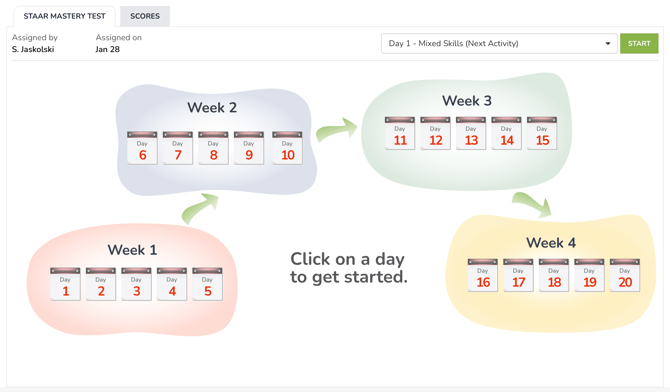
Activities include Passage Quizzes, writing practice with AI feedback, Test Prep Experiences, Ignition Warm Ups, and Power-Up activities.
Every day includes a STAAR-style passage quiz targeting specific STAAR standards.
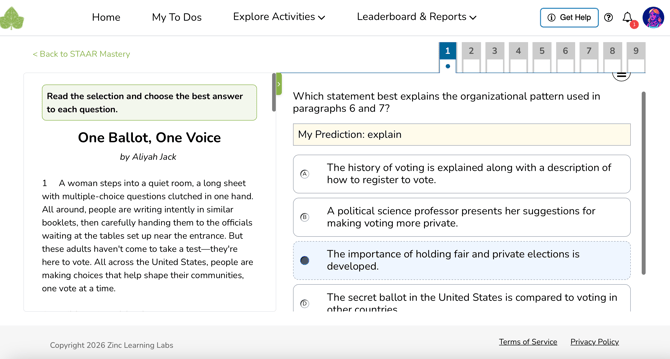
These quizzes:
-
Require students to make a prediction before answer choices appear
-
Include test-taking tools such as strikethrough and flag for review
-
Span fiction, nonfiction, poetry, and paired texts*
*Note: Days 11-15 feature paired texts. These days should be assigned in order.
Once a prediction is made and the answers are available, students may click the three horizontal lines icon, also known as a “hamburger” button that looks like this: ≡
In this menu, students may select the strikethrough or review options.
While in strikethrough mode, clicking on a multiple choice option known to be incorrect will cause it to be crossed out. Clicking an answer again in this mode will remove the strikethrough. Students can leave this mode by clicking the green "Exit Strikethrough Mode" button.
Selecting the review option will place a “flag” on the question. This way, students can continue to progress and then return to questions that they were not sure what to select.
When a student submits their completed practice test, they are asked if they’d like to review any questions. At this time, any questions flagged for review are immediately visible. Clicking on a question will take them directly to that question.
Ignition Warm Ups
Ignition Warm Ups are short, interactive reading refreshers embedded directly into STAAR Mastery during Weeks 1 and 2.
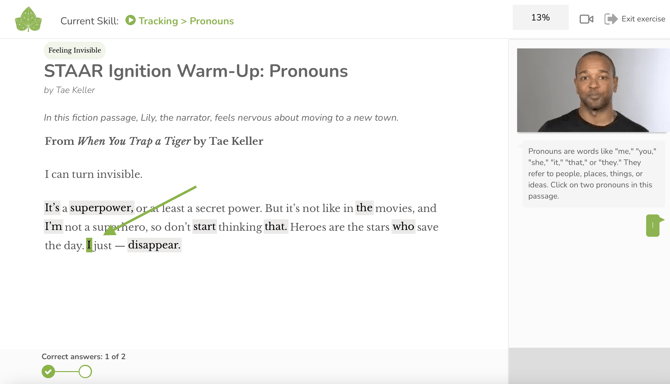
Each warm-up:
-
Takes 3–5 minutes
-
Uses a brief, interactive passage
-
Prepares students to read and analyze the STAAR-level texts they see throughout the program
Ignition Warm Ups target four core reading skills:
-
Use Your Senses
-
Make It Real
-
Pronouns
-
Navigators
Beginning in Week 2, students complete interactive Test Prep Experiences that explicitly teach and reinforce Zinc’s 4-step test-taking method:
-
Read
-
Predict
-
Maybe or No
-
Every Word Matters
In each Test Prep Experience, students:
-
Read and comprehend a STAAR-style passage using the Ignition reading skills
-
Learn and practice Zinc’s test-taking method
-
Work through one sample multiple-choice STAAR question, step by step
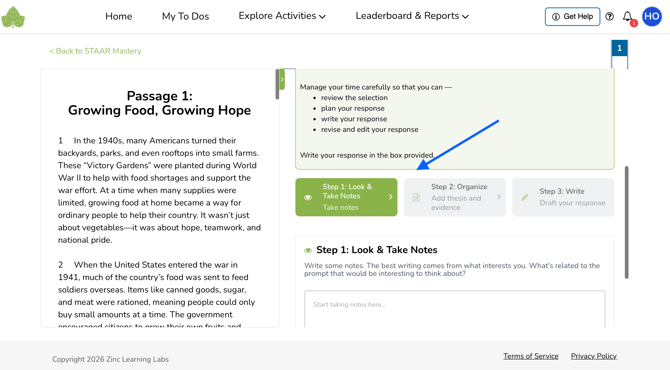
STAAR Mastery includes both Short Constructed Responses (SCR) and Extended Constructed Responses (ECR) aligned to STAAR expectations.
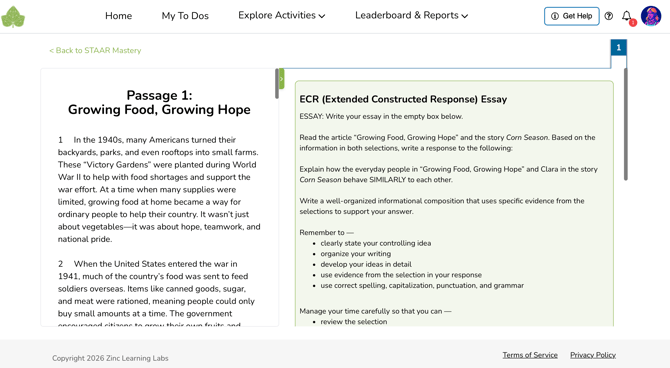
Students are guided through a 3-step writing process:
-
Look and Take Notes
-
Organize (Thesis + Evidence)
-
Write (First + Revised Draft)
Once students have written their first draft, they:
-
Click “Get Feedback”
-
Receive targeted AI coaching
-
Revise and submit a final response
From Reports, teachers get:
-
Access to the student's final submission + first draft
-
An AI-suggested score
-
The option to accept or adjust the scoreoverallof
Every student works at a different pace, and Zinc is a helpful tool in managing students who finish early. STAAR Mastery includes Power-Up activities that continue to challenge students when you don't want them working ahead.
Power-Up Activities allow students to select from:
-
Vocabulary practice
-
Articles and quizzes
-
Interactive Close Reading Experiences
These activities provide meaningful STAAR-aligned practice without moving students ahead in the core sequence, making them ideal for early finishers while others complete assigned work.
Just tell your students who move a little faster to do their Power-Up activities!
Teachers track student progress using STAAR Mastery reports. Reports show completion, scores, and even performance on standards.
To access these reports, go to your Zinc homepage and click the green "View Report" button to the right of a class's STAAR Mastery assignment.

If the assignment is no longer visible on your homepage, access reports this way:
-
Click “View Classes and Reports”
-
Click “Reports”
-
Under “Activity Progress Report” choose your class and STAAR Mastery“ Generate Report
-
Click “View Report”
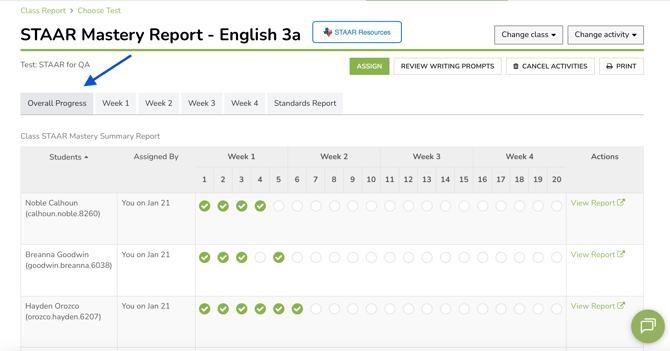
The report will open to Overall Progress, providing a class overview at a glance. You can quickly switch between classes using the "Change class" dropdown menu.
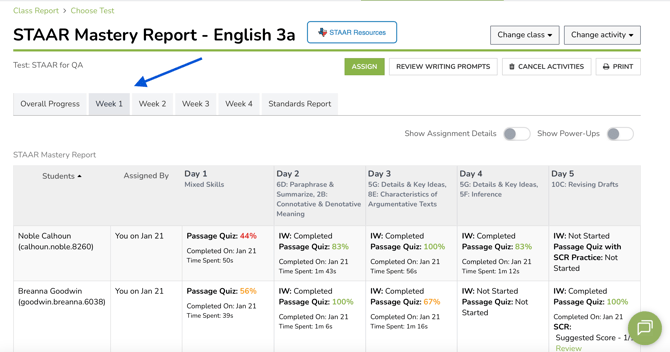
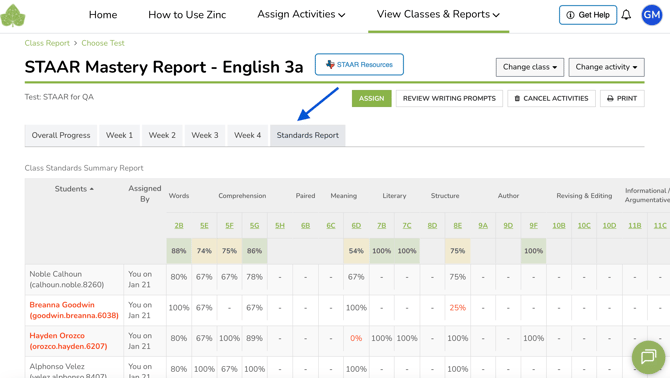
From here, you can click "Assign" to quickly give the assignment to any students who still need it. You can also use the buttons to cancel the activity, assign reteaches, or print the report. To see further details about each week, the Mini-Ignition Report, or the Standards report, click on those tabs.
Use the Overall Progress tab to track completion through the program.
View SCR/ECR scores
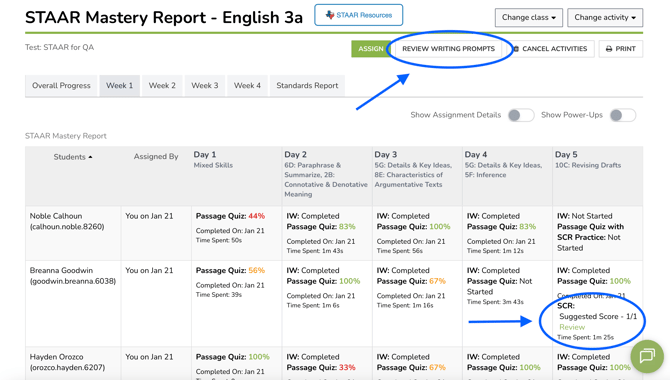
Your "Week" view tabs show AI suggested scores for completed SCR/ECR writing responses. Dive deeper and review students' actual written responses in two ways:
-
Click "Review Writing Prompts" to view a list of all completed student writing prompts.
-
Or, click "Review" directly in the report to view a specific student's work.
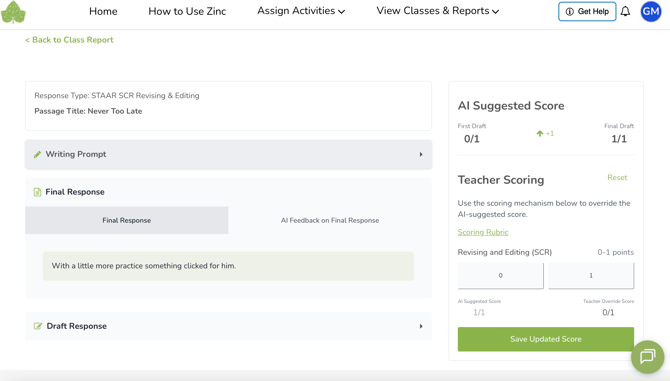
Once you've clicked into a student's individual response, you can:
-
View the final submission
-
Review first drafts
-
Use or override the AI suggested score
-
Access the scoring rubric for each prompt type
New for 2026! Reteach quizzes are now fully integrated into the app.
When checking on student performance in STAAR Mastery, you may find students who would benefit from additional instruction. For these students, we provide reteach quizzes.
To assign reteaches, go to your STAAR Mastery Report (accessible by clicking "View Report" next to the class assignment on your homepage). On the tab for each week, you can assign the a day's reteach to individual students or groups of students. Just click "Assign Reteach" for the day in question and follow the onscreen instructions.
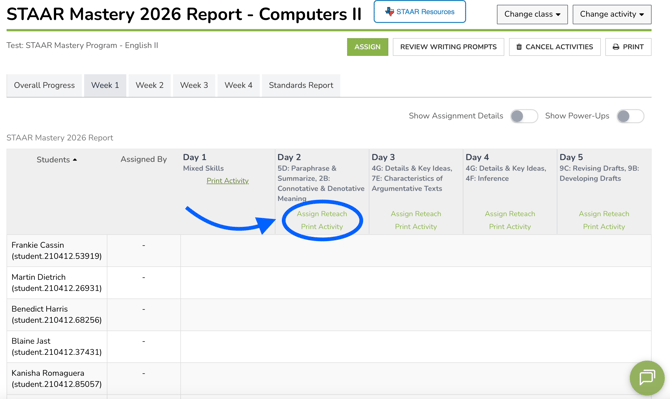
If you prefer an offline reteach, you may also print the activity directly from this page. You just need to click "Print Activity" for that day.
Reteach quizzes provide new questions on the same skills and passage as the day's main quiz. Reteach quizzes are ideal for:
-
Small groups
-
Intervention blocks
-
Targeted STAAR skill review
-
Additional practice at home
Targeted Reteach Quizzes are available for most days* in STAAR Mastery. These short quizzes focus on the same passage and target the same standards as the day's main quiz. They contain multiple-choice questions and/or SCR practice, but have fewer questions.
Using report data, teachers can:
-
Identify students who may benefit extra practice (scores highlighted in yellow or red)
-
Assign reteach quizzes with one click
-
Immediately see results once students complete them
*Note: Reteach Quizzes are not available for days with Mixed Skill practice or ECR practice. For further ECR review, we suggest helping students revise the essay assigned for the day's main quiz.
STAAR Mastery provides daily completion data and scores for passage quizzes and SCR/ECR writing practice. Many teachers choose to:
-
Count STAAR Mastery as completion or participation
-
Use passage quizzes and writing feedback as formative data
-
Use time-on-task data to shape conversations on effort
-
Incentivize improvement by counting a reteach quiz for the day's grade
Assign STAAR Mastery Now
Are you ready to equip your students for STAAR? Assign Zinc STAAR Mastery now! If you need STAAR Mastery enabled for your school or district, please email partnerships@zinclearninglabs.com.
STAAR Mastery Error Reporting
Zinc STAAR Mastery is a pilot program. If you run into any issues, please report them using this form. Thank you for your help in making Zinc STAAR Mastery even better